# For a new website

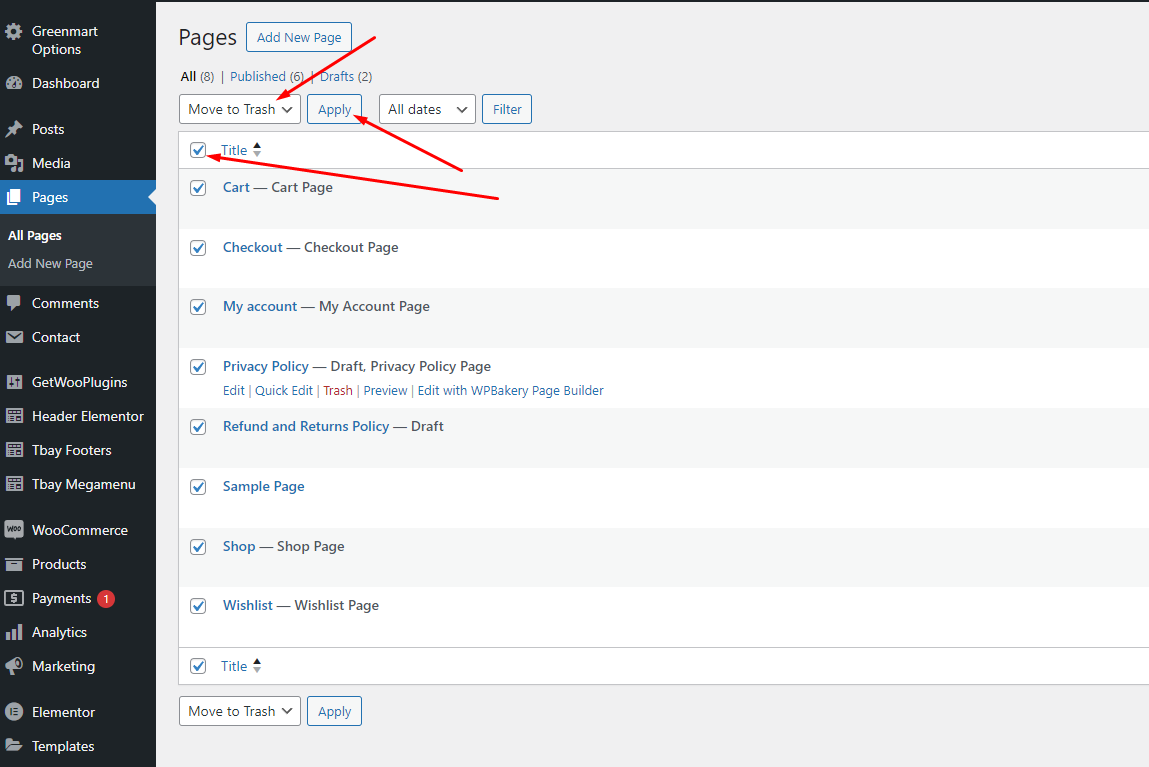
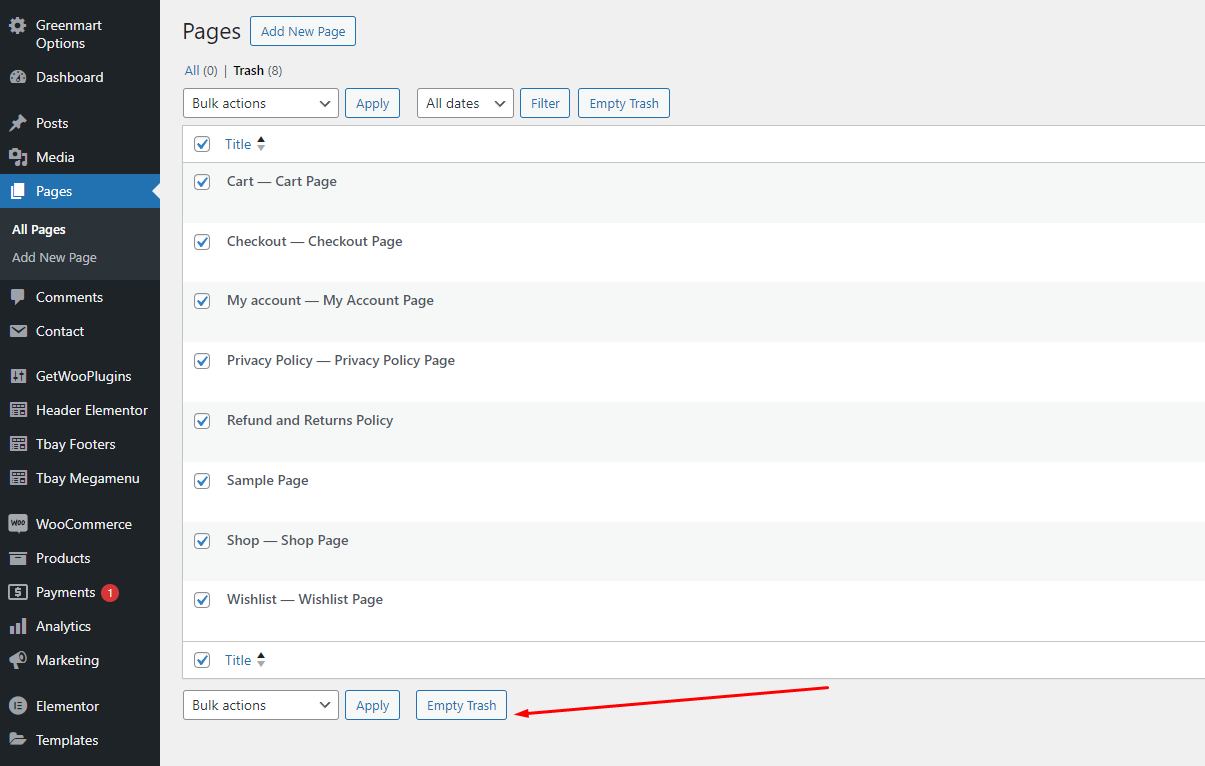
{% hint style="warning" %} <mark style="color:red;">**First, delete the default pages that the WooCommerce plugin created**</mark>
{% endhint %}

<figure><img src="https://files.gitbook.com/v0/b/gitbook-x-prod.appspot.com/o/spaces%2Fj3cdCheeDtqYoKsBdgbv%2Fuploads%2FSqHSAgfXy5QTNN7fKGE9%2FScreenshot_7.png?alt=media&#x26;token=04f00834-4dd6-4ca4-a9ad-258484c0a904" alt=""><figcaption><p>Move the Shop, Cart and Checkout pages to the trash</p></figcaption></figure>

<figure><img src="https://files.gitbook.com/v0/b/gitbook-x-prod.appspot.com/o/spaces%2Fj3cdCheeDtqYoKsBdgbv%2Fuploads%2FU5f1C0KWtljcqalH93d7%2FScreenshot_8.png?alt=media&#x26;token=4ed384e3-2c2a-4a4a-9f88-c04fa7c570d9" alt=""><figcaption><p>Empty the trash to completely remove those pages</p></figcaption></figure>

* [x] <mark style="color:purple;">**Step 1**</mark> - Login to your **WordPress Dashboard**.
* [x] <mark style="color:purple;">**Step 2**</mark> - Go to **Appearance** > **Theme Setup** > **Click to Start**

![](https://223098452-files.gitbook.io/~/files/v0/b/gitbook-x-prod.appspot.com/o/spaces%2F9XunEbX6doqYSi8XZWwn%2Fuploads%2F1bF9UXGwhaVaE2t5GXrz%2FScreenshot_15.png?alt=media\&token=172c43e9-644e-465a-80be-9f6e84acc4f6)

* [x] <mark style="color:purple;">**Step 3**</mark> - **Install Child Theme**

![](https://223098452-files.gitbook.io/~/files/v0/b/gitbook-x-prod.appspot.com/o/spaces%2F9XunEbX6doqYSi8XZWwn%2Fuploads%2Fu49JVeDWbrmGvEa3hSLd%2FScreenshot_16.png?alt=media\&token=7caa3aca-4558-4b0f-8664-97571ca53d03)

* [x] <mark style="color:purple;">**Step 4**</mark> - **Import Content**: Select the **Demo you want**, then click on **Import**

<figure><img src="https://223098452-files.gitbook.io/~/files/v0/b/gitbook-x-prod.appspot.com/o/spaces%2F9XunEbX6doqYSi8XZWwn%2Fuploads%2F1a41z5qtwRjRaE0i0sLG%2FScreenshot_17.png?alt=media&#x26;token=4555ac38-52de-4fe9-bb05-4f941d9390f6" alt=""><figcaption></figcaption></figure>

**The process may take some time. Please wait**

![](https://223098452-files.gitbook.io/~/files/v0/b/gitbook-x-prod.appspot.com/o/spaces%2F9XunEbX6doqYSi8XZWwn%2Fuploads%2FdIALSxkcMRdSCSyGjuW2%2FScreenshot_18.png?alt=media\&token=f2c3e13a-196c-4446-a2bd-469c21ab21ec)

:tada:**All done. Have fun!**

![](https://content.gitbook.com/content/9XunEbX6doqYSi8XZWwn/blobs/hBnk9uMF1CfCkd9ZNxga/import-setup-5.png)

* [x] <mark style="background-color:purple;">**Step 5 (Important Step)**</mark> - **Regenerate CSS** for **Elementor**: Styles set in Elementor are saved in CSS files in the uploads folder. Recreate those files, according to the most recent settings.

![](https://content.gitbook.com/content/9XunEbX6doqYSi8XZWwn/blobs/S9gGnwYwwb7yuDa73NIa/import-data-fix3.png)

* [x] <mark style="color:purple;">**Step 6**</mark> - Elementor Settings: Enable Elementor for Thembay Blocks. Disable Default Colors, Disable Default Fonts.

![](https://223098452-files.gitbook.io/~/files/v0/b/gitbook-x-prod.appspot.com/o/spaces%2F9XunEbX6doqYSi8XZWwn%2Fuploads%2Fq49mwsRNFLpGnRYEFyxK%2FScreenshot_1.png?alt=media\&token=af641d28-4180-4256-ae8b-0b051e91c943)

* [x] <mark style="color:purple;">**Step 7**</mark> - Replace URL: Enter your old and new URLs for your WordPress installation, to update all Elementor data.

![](https://content.gitbook.com/content/9XunEbX6doqYSi8XZWwn/blobs/2wqm5W3v3DAYcbptAw0i/demo-content-e-replace-1.png)

* **Old URL**: It is the demo link where you imported the data, eg: <https://vova.thembaydev.com/>, <https://vova.thembaydev.com/demo-02>
* **New URL**: Your website's link

![](https://content.gitbook.com/content/9XunEbX6doqYSi8XZWwn/blobs/A7VJtTbo4f4XcxnfW2yX/demo-content-e-replace-2.png)

* [x] <mark style="color:purple;">**Step 8**</mark> - Choose Shop Page: Go to **WooCommerce** > **Settings** > **Products** > **General** > **Shop Page**

![](https://content.gitbook.com/content/9XunEbX6doqYSi8XZWwn/blobs/40kb6dvYnlaSaoGu8IMX/import-data13.png)

{% hint style="info" %}
When you install the WooCommerce plugin, your website will automatically create a Shop page. Therefore, when importing Vova data, it will have two Shop pages. You need to delete a page. Please follow this video:
{% endhint %}

{% embed url="<https://www.youtube.com/watch?feature=emb_title&time_continue=1902&v=qpYr5CSXfBQ>" %}

* [x] <mark style="color:purple;">**Step 9**</mark> - Fix style errors in cart and checkout pages (using Shortcode, instead of WooCommerce's default page) (If you forgot to delete WooCommerce pages after installing the plugin)

- Step 1: Delete all cart and checkout pages.
- Step 2: Create a new cart and checkout page with the shortcode.&#x20;
- Step 3: Select page cart and checkout

{% hint style="info" %}

### **Watch detailed video instructions here:**

{% endhint %}

{% embed url="<https://youtu.be/3Z5HkRAtFbg>" %}

* [x] <mark style="color:purple;">**Step 10**</mark> - Configure Mega Menu

![](https://content.gitbook.com/content/9XunEbX6doqYSi8XZWwn/blobs/bZu4WFGdv0K7zu4EtaE7/import-data-menu-1.png)

![](https://content.gitbook.com/content/9XunEbX6doqYSi8XZWwn/blobs/dwepAaazWYs9UDO2IXWX/import-data-menu-2.png)

![](https://content.gitbook.com/content/9XunEbX6doqYSi8XZWwn/blobs/khug7jp8bGNnzGH6bxv4/import-data-menu-3.png)

#### Please follow this video:

{% embed url="<https://www.youtube.com/watch?v=Tg_4gT9quXM>" %}

* [x] <mark style="color:purple;">**Step 11**</mark> - Configure the Product Attributes

![](https://223098452-files.gitbook.io/~/files/v0/b/gitbook-x-prod.appspot.com/o/spaces%2F9XunEbX6doqYSi8XZWwn%2Fuploads%2FjQc9HmEX2MM7I9q5yCGs%2FScreenshot_9.png?alt=media\&token=6293c3cd-79b7-4adc-b06c-c362b9732a25)

You need to match the types of attributes, eg: Color => Type = Color

![](https://content.gitbook.com/content/9XunEbX6doqYSi8XZWwn/blobs/vhLgWnKNE677bvDwy1Z7/import-data-woo-attribute-2.png)

![](https://content.gitbook.com/content/9XunEbX6doqYSi8XZWwn/blobs/Gw6QHL2qdlMfleyYYyv3/import-data-woo-attribute-3.png)